AI Governance
AI governance for enterprises,
built into every request
Most AI rollouts add governance after the fact — a policy document nobody enforces, a spend report nobody acts on. AskProso puts identity, policy, budget and audit directly in the request path, so every AI conversation in the organisation is already inside the rules before it starts.
AI governance is the set of controls — identity, policy, budget and audit — that decide who can use which AI capability, under what limits, with every action attributable afterwards. AskProso runs these checks in the request path itself: a prompt passes through identity, policy and budget gates before it ever reaches a model, and the outcome — allowed, warned, or blocked — is logged either way.
How it works
One prompt,
five checkpoints
Every request — chat, voice, image or document — passes through the same five gates, in order, regardless of which model answers it.
Identity
Entra SSO resolves the person, their role and their group.
Policy gate
Org defaults set the floor; group policies tighten them per team.
Budget gate
Monthly and daily envelopes, thresholds, then a hard limit.
Model router
The call lands on an approved model, with a configured fallback.
Audit & analytics
Attributed to a user, a team and a model — then logged.
Allowed
Within policy and budget — the request runs and is logged.
Warned
Threshold crossed — managers are alerted while work continues.
Blocked
Hard limit or blocked feature — the call never reaches a model.
Policy gate
Org-wide guardrails, tightened per team
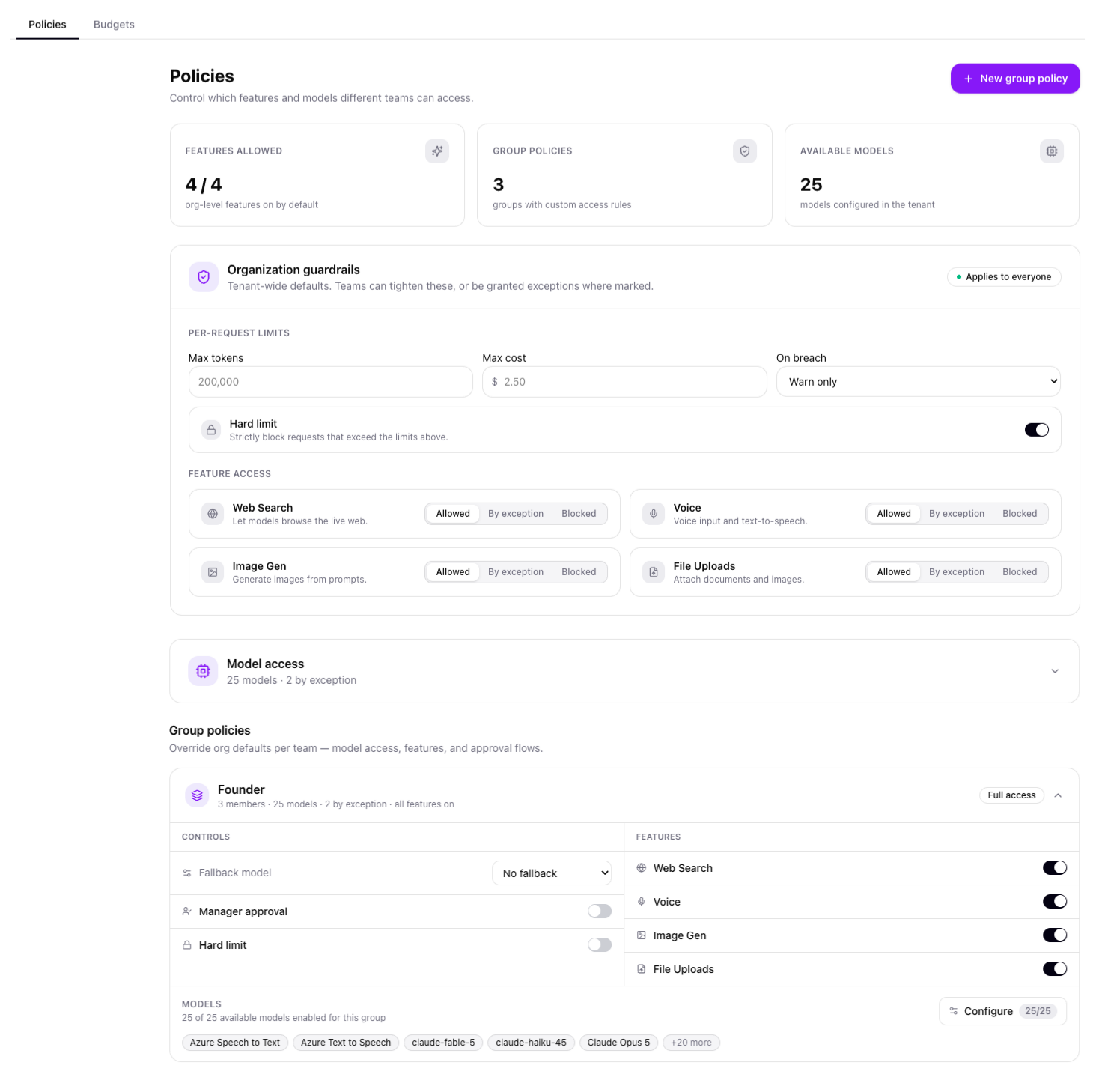
Organisation guardrails set per-request limits — a maximum token count, a maximum cost, and an enforcement action for what happens on breach — plus a tenant-wide switch for web search, voice, image generation and file uploads. Group policies then sit on top: a team can be tightened further, or granted a named exception, without anyone touching the org-wide defaults.
- Per-request ceilings on tokens and cost, with a hard-limit toggle that blocks rather than just warns
- Web search, voice, image generation and file uploads gated independently — allowed, by exception, or blocked
- Each group's policy page shows its model count against the tenant total and any models enabled by exception
- A group can set its own fallback model and require manager approval, without affecting any other team
Identity & roles
Access decided by identity, not a shared password
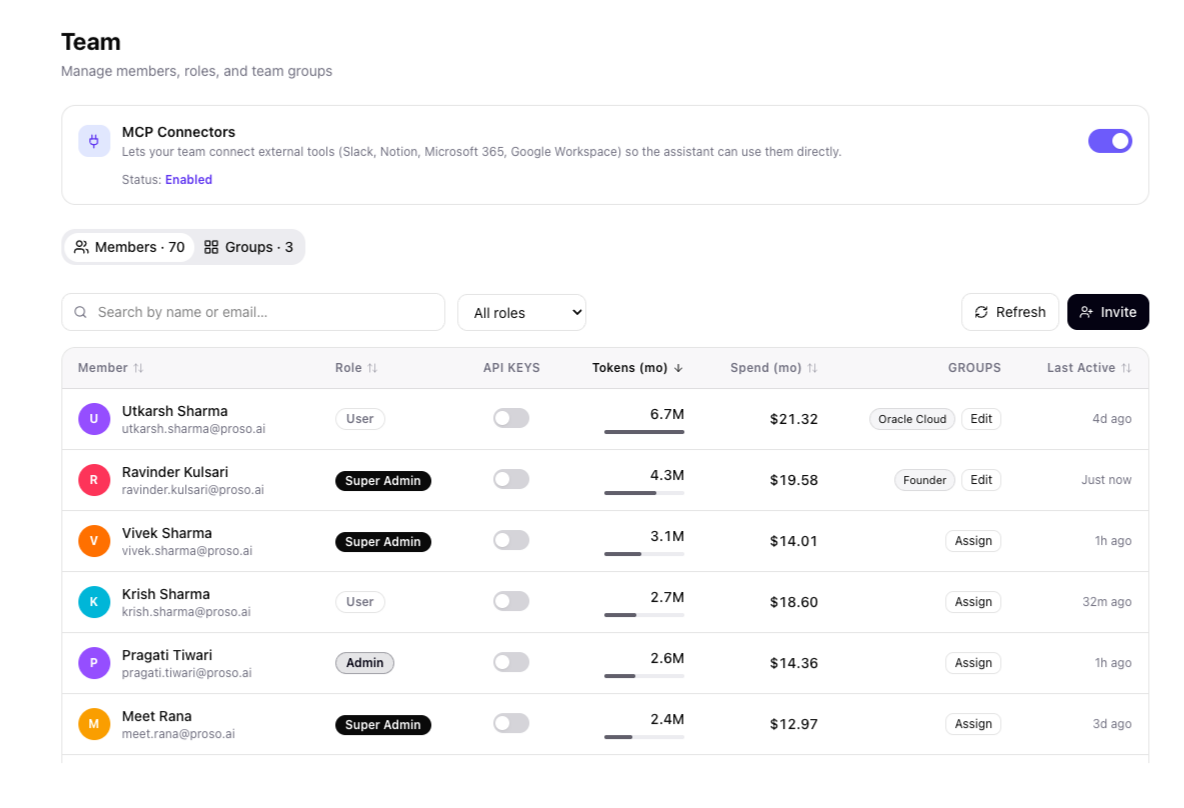
Microsoft Entra SSO resolves who someone is, which role they hold and which group they belong to before any policy is evaluated. Roles run from User through Admin to Super Admin, and every member's group membership, token usage and spend are visible from one table — so access isn't a spreadsheet someone maintains by hand, it's a property of the identity system you already run.
- Conditional access, MFA and group-based provisioning apply to AI usage the same way they apply to email or file shares
- Roles gate who can change policy versus who can only operate under it
- Group membership drives which policy and budget a person's requests are evaluated against
- Per-member tokens, spend and last-active are visible without exporting a report
Why it's built this way
Governance that holds,
not governance you hope for
Four properties an enterprise AI governance framework needs to actually work — and where each one lives in AskProso.
Identity-bound
Every request carries a real identity from Entra SSO — not a shared API key nobody can attribute afterwards.
Layered, not flat
Org guardrails set the floor; group policies tighten or except. One team's exception never becomes everyone's default.
Enforced, not advisory
A hard limit blocks a request before it reaches a model. It doesn't file an alert about an overrun that already happened.
Logged either way
Allowed, warned or blocked, the outcome is attributed to a user, team and model — so the audit trail has no gaps to explain.
Governance, in detail
Questions about
how the controls work
Mechanics IT and security teams ask about before they'll sign off on an AI rollout.
An organisation guardrail is the tenant-wide default — the floor every team starts from, applied automatically to everyone. A group policy sits on top of it and can tighten access further, or grant a named group a specific exception. In practice this means a finance team can be held to stricter model and budget limits than the rest of the company without anyone touching the org-wide settings.
Policy changes are restricted to Admin and Super Admin roles, resolved through Microsoft Entra at sign-in. A regular User can use whatever the policy allows them to use, but cannot see or edit the guardrails themselves — so the people who set the rules and the people who operate under them are cleanly separated.
No. Feature access — web search, voice, image generation, file uploads — is gated per group, not globally. Turning off image generation for a customer-support team has no effect on product or engineering, each of which can be configured independently against the same organisation guardrail.
It depends on the enforcement action configured for that gate. A policy or budget breach can warn only — the request proceeds and an alert is raised — or it can hard-block, where the request never reaches a model at all. Organisations typically warn on early thresholds and hard-block once a critical threshold or a token/cost ceiling is crossed.
They overlap but answer different questions. Security asks whether a request is authenticated and safe to execute; governance asks whether it should be allowed to happen at all under this organisation's policy, budget and role structure — and whether there's a record of it afterwards. AskProso's identity layer (Entra SSO) covers security; the policy, budget and audit layers cover governance.
Yes. Each group's policy page shows its model count against the tenant total, which models are enabled by exception, which features are toggled on, and any fallback model configured for that group — so an administrator can audit one team's access without cross-referencing several screens.
See it end to end
The rest of the platform is built
on the same governance layer
Budgets, usage analytics, adoption reporting and the full admin console — see how they fit together, screen by screen.