Budget Controls
AI budget controls for enterprises,
enforced, not just reported
A spend dashboard tells you what happened last month. A budget control stops it from happening this month. AskProso sets thresholds at organisation, team and individual level, then gives each one a hard limit that actually blocks usage — not an alert that lands in an inbox nobody reads.
AI budget control is the set of limits — monthly and daily spend caps, warning and critical thresholds, and a hard limit — that decide how much an organisation, team or individual can spend on AI before requests are throttled or blocked outright. AskProso evaluates these limits in the request path itself: a call that would breach a threshold is stopped before it reaches a model, not flagged after the invoice arrives.
Organisation envelope
One top-level budget, with team lanes underneath it
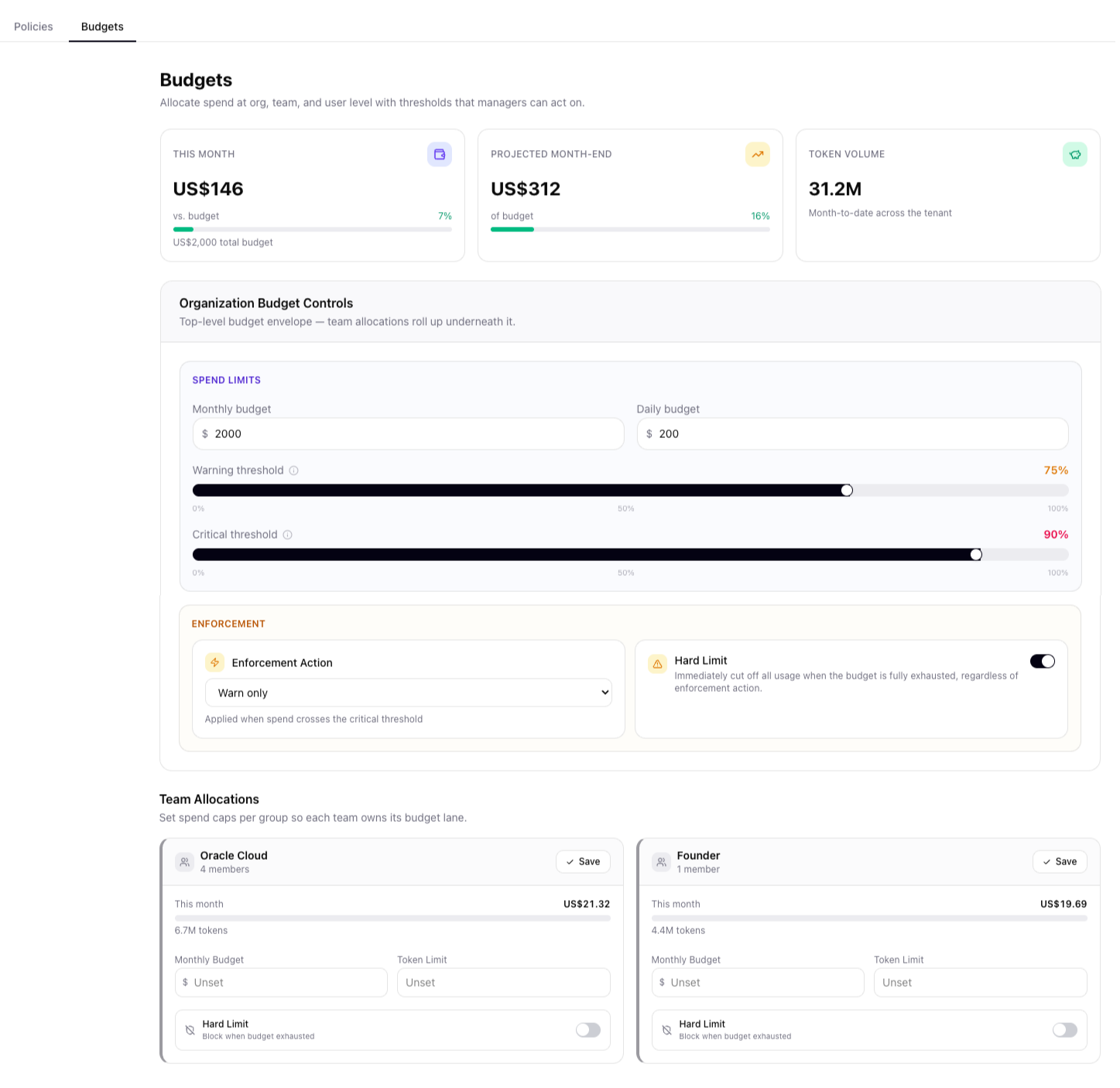
A monthly and a daily spend limit define the organisation's overall envelope. Warning and critical thresholds sit inside it — cross the warning line and managers are alerted; cross the critical line and the configured enforcement action applies. Team allocations then roll up underneath the same envelope, each with its own budget, token limit and hard-limit toggle.
- Monthly budget plus a separate daily budget, so one heavy day can't burn a month's allowance in a week
- Warning threshold (typically 75%) and critical threshold (typically 90%), each set independently
- An enforcement action — warn only, or block — applied automatically when spend crosses the critical line
- A hard limit that cuts off all usage immediately once the budget is fully exhausted, regardless of enforcement action
Where it goes
Spend traced back to a user, a team and a model
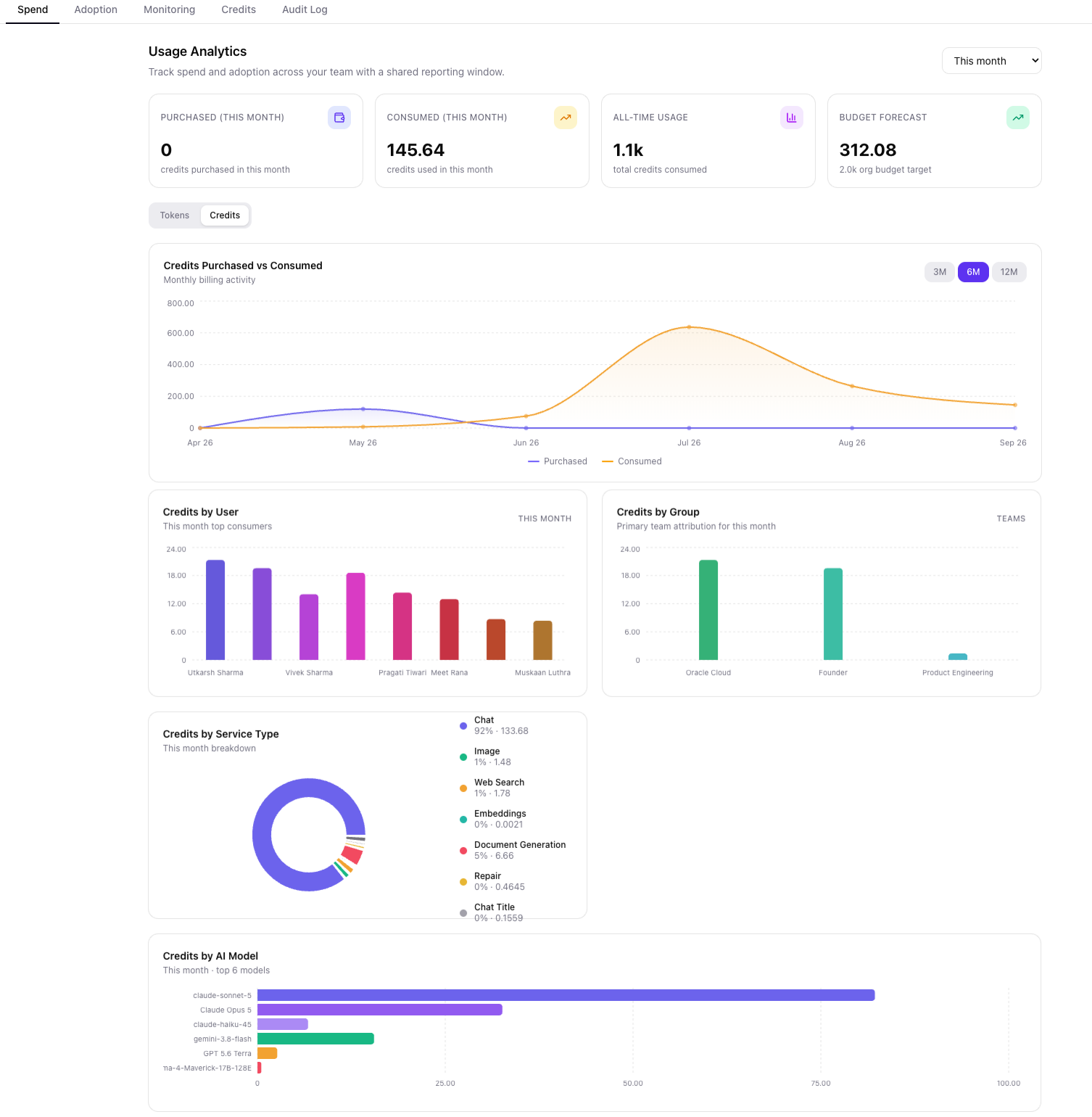
A budget only means something if you can see what's actually consuming it. Usage analytics breaks the same numbers down by user, by group, by service type — chat, image, web search, document generation — and by the specific AI model that answered the call, with a projected month-end figure calculated from the current burn rate.
- Credits purchased versus consumed, tracked over 3, 6 or 12 months
- Top consumers ranked by credits, by both individual and team
- Service-type breakdown showing what share of spend is chat, image, web search or document generation
- Top models by consumption, so a cost conversation starts from evidence, not a guess
Why it's built this way
Budgets that hold,
not budgets you hope for
Four properties an enterprise AI budget control needs to actually work — and where each one lives in AskProso.
Two thresholds, one decision
A warning threshold flags early; crossing the critical threshold triggers the enforcement action you configured — warn, or block.
Cascading, not shared
Organisation, team and individual budgets are separate lanes. One team's overrun doesn't quietly eat into another's runway.
Blocks, not just warns
With hard limits on, usage stops the moment a budget is exhausted — enforced before the call reaches a model, not after the invoice.
Forecasted, not backward-looking
Projected month-end spend is calculated from the current burn rate, so a problem is visible while there's still time to act on it.
Budget controls, in detail
Questions finance and IT
ask before signing off
Mechanics that come up when a budget owner is deciding whether these limits will actually hold.
A warning threshold — typically set around 75% of the budget — raises an alert but lets requests through, so managers see the trend before it becomes a problem. A hard limit is the point at which AskProso stops requests outright rather than just flagging them. Between the two sits a critical threshold, usually around 90%, where the configured enforcement action — warn only, or block — actually applies.
Both, and independently. A monthly budget caps total spend for the billing period; a daily budget caps how much of that can be burned in a single day, which stops one heavy day from exhausting a month's allowance in a week. Organisations typically set the monthly figure from their overall AI budget and the daily figure as a smaller safety rail underneath it.
The organisation budget is the top-level envelope; team allocations are lanes underneath it, not separate pools. Each team can carry its own monthly budget and token limit, and its own hard-limit toggle — so one team hitting its cap doesn't affect another team's runway, but the sum of team activity still counts against the org-wide total.
Yes. Budget enforcement runs at three levels — organisation, team and individual user — so a single high-usage member of an otherwise well-behaved team can still be capped without touching that team's overall allocation.
Per-request limits are evaluated before the call reaches a model — a maximum token count and a maximum cost per request. If a single request would exceed either, it's handled according to the configured enforcement action for that breach: warned through, or blocked outright if the organisation has hard limits enabled.
The budget dashboard shows month-to-date spend against the total budget alongside a projected month-end figure, calculated from the current burn rate. That forecast is what lets a finance or IT lead act before the month closes, rather than finding out after the invoice.
See it end to end
Budgets are one layer
of a governed AI platform
Identity, policy, budget and audit all run in the same request path — see how the pieces fit together, screen by screen.