Microsoft Entra Integration
AI chat with Microsoft Entra SSO,
not a bolted-on login
Most AI tools ask for another password, or add SSO as an afterthought. AskProso authenticates through Microsoft Entra from the start — so the identity, role and group your organisation already manages is the same identity that governs every AI request.
Microsoft Entra integration for enterprise AI means the platform authenticates through your existing Entra tenant rather than running its own login system — so conditional access, MFA and group-based provisioning apply to AI usage automatically. In AskProso, Entra doesn't just gate the sign-in screen: it resolves the role and group that every downstream policy and budget decision is evaluated against.
Identity resolved, not re-created
One identity system, one access table
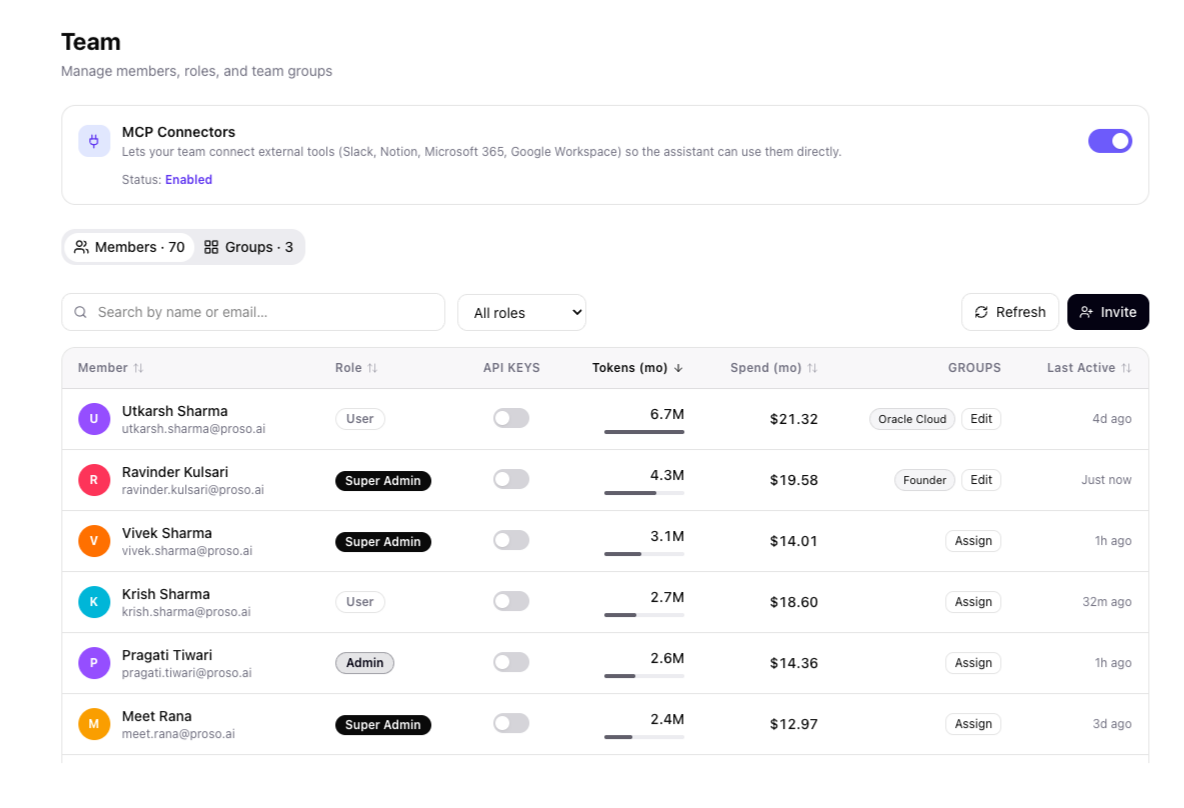
There's no separate AskProso password and no separate directory to keep in sync. Microsoft Entra resolves who someone is; AskProso reads their role and group from that same identity and evaluates every policy and budget decision against it.
- Conditional access and MFA apply to AI usage exactly as they apply to email or file shares — no parallel policy to maintain
- Roles — User, Admin, Super Admin — map directly onto what a person can see and change in the admin console
- Per-member tokens, spend, group membership and last-active are all visible from one identity-driven table
- Removing someone in Entra removes their AI access the same way it removes everything else
Group-based provisioning
Entra groups become policy-bearing groups
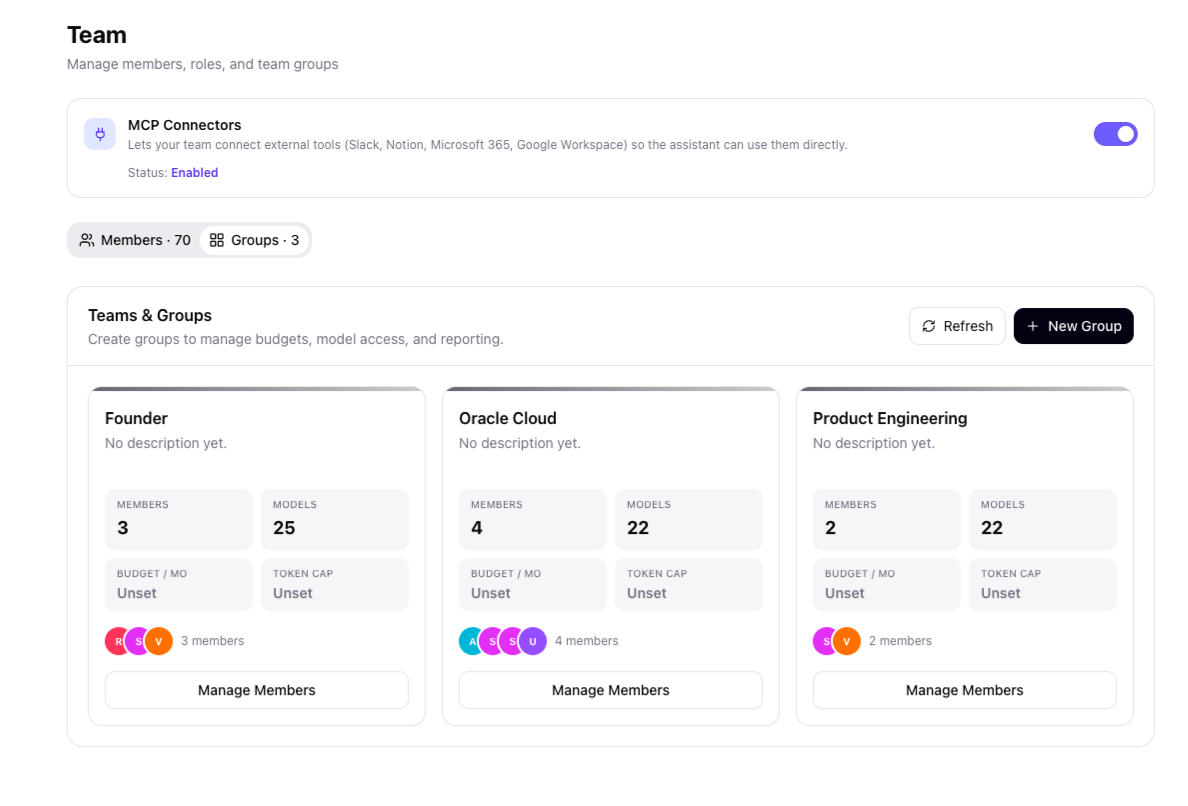
Group-based provisioning in Entra is what puts someone into a team in the first place. Those same groups carry their own model access, feature flags, budget and token cap in AskProso — so adding a person to a group in your identity system is the access grant, not a separate step an admin has to remember to make.
- Each group's member count, model access and budget are visible from one screen
- A new group can be created directly for a team that needs its own policy or budget lane
- Group membership — not a manually assigned permission — is what a person's policy and budget are evaluated against
- 70 members across 3 groups here map to the same structure IT already provisions upstream
Why it's built this way
One identity system,
not a second one to maintain
Four properties an enterprise Entra integration needs to actually work — and where each one lives in AskProso.
One identity, not two
No separate AskProso password or directory — the same Entra identity that gates your other systems gates every AI request.
Conditional access, inherited
MFA and conditional access already configured in Entra cover AI usage without a parallel policy to set up and maintain.
Groups drive policy, not admins
Group membership is what determines a person's model access, feature access and budget — provisioning is the access grant.
Deprovisioning is instant
Remove someone from Entra and their AI access goes with it — there's no separate account to remember to disable.
Entra integration, in detail
Questions IT asks
before rolling this out
Identity mechanics that come up when a security team is deciding whether AI usage fits inside existing access controls.
It uses your existing Microsoft account. AskProso authenticates through Microsoft Entra SSO rather than running its own password system, so there's no second set of credentials for people to manage or for IT to reset.
More than sign-in. Conditional access, MFA and group-based provisioning all work out of the box, because AskProso authenticates through Entra rather than around it. Whatever access rules your organisation already enforces for other systems apply to AI usage the same way.
Someone's group membership is what determines which AskProso group policy and budget their requests are evaluated against — model access, feature access, spend limits. Provisioning a person into a group is effectively granting or restricting their AI access, not a separate administrative step.
It changes immediately, the same way access to anything else gated by that identity changes. There's no separate AskProso account to remember to disable — access follows the identity, and the identity is Entra's.
Entra establishes who someone is; the role that person holds inside AskProso — User, Admin or Super Admin — is what determines whether they can operate under policy or change it. Every policy and budget decision is then evaluated against that resolved identity and role together.
No. Because sign-in runs through your existing Entra tenant, whatever conditional access and MFA policies are already configured there apply to AI usage automatically — there's no parallel security policy to set up and keep in sync.
See it end to end
Identity is the first gate
in a governed AI platform
Once Entra resolves who someone is, policy, budget and audit take over — see how the pieces fit together, screen by screen.